Employee Request Form Workflow
Automate employee HR requests end to end.
New to n8n? Start free with n8n Cloud (14-day trial, no credit card required).
Overview
Employees fill out a single Google Form to request a title change, pay change, equipment, or schedule change. The request is logged in a Google Sheet and the manager receives an email with Approve and Reject links. The decision is written back to the same row along with who decided and when.
What it does
- Triggers automatically when the Employee Request form is submitted
- Validates the request and writes it to a Google Sheet as Pending
- Sends the manager an approval email with Approve and Reject links
- Updates the same row to Approved or Rejected with a decision timestamp and the manager's email
- Notifies the employee of the decision
- Logs validation and step failures to a dedicated Error Log sheet
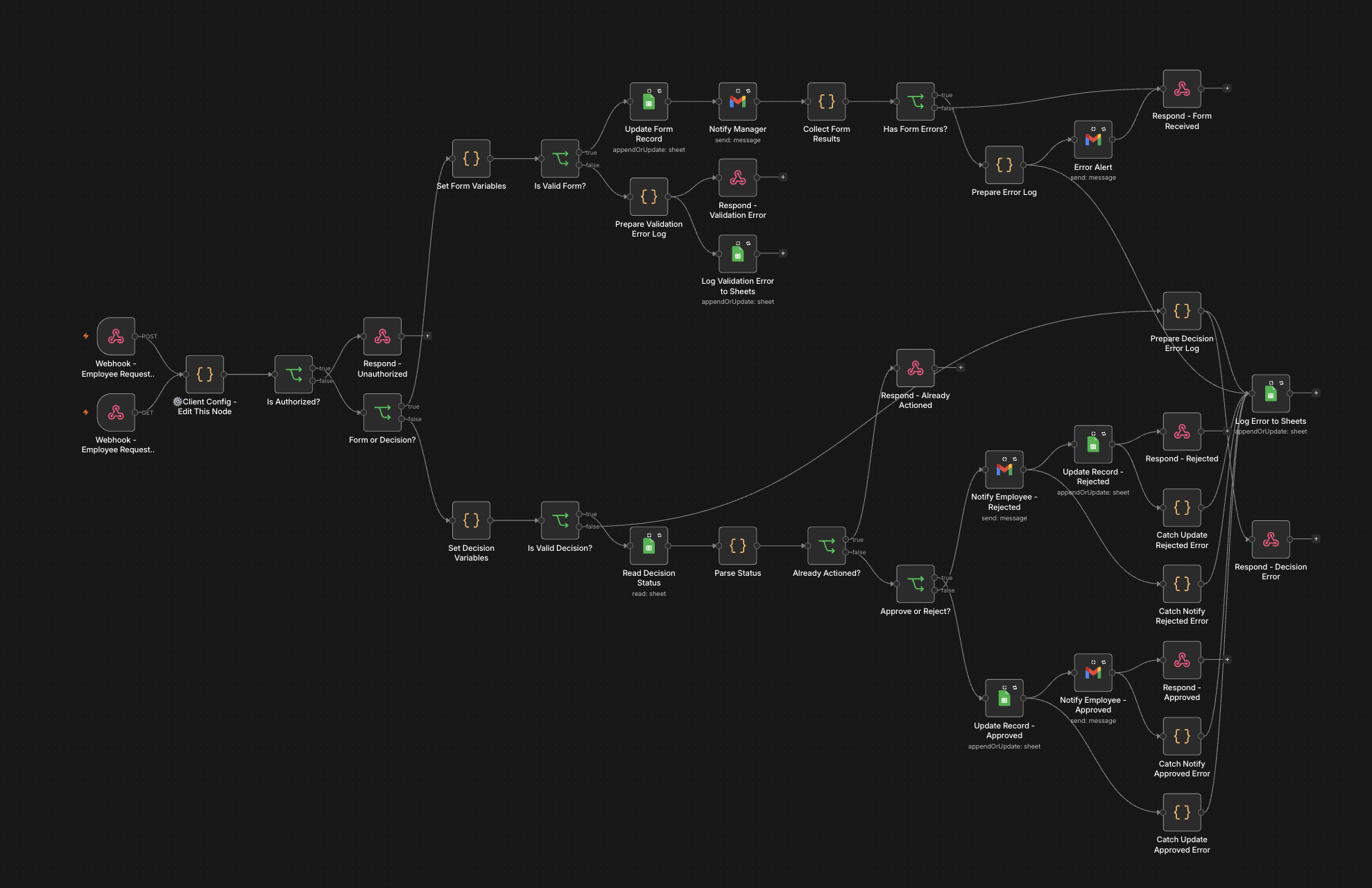
The complete workflow.
Prerequisites
- A Google Workspace user account (no admin access required)
- A Google Cloud project with the Gmail and Sheets APIs enabled (no Service Account, no Domain-Wide Delegation needed)
- A running n8n instance (self-hosted or cloud)
Pricing
$59 one-time payment. After purchasing on Gumroad, come back here and open Configure to enter your license key and download the workflow files.
What is included
- Production-ready n8n workflow (configure and import: no JSON editing)
- Google Apps Script (connects Google Forms to n8n securely)
- HMAC-SHA256 webhook authentication
- Automatic retry logic for failed requests
- Error logging to a Google Sheets tab
- Configuration tool (no JSON editing required)
- Step-by-step setup guide
How to set it up
Setup takes 15-25 minutes. Here's what's involved:
-
1 Copy the Google Form and Google Sheet
Visit tl-hr.com and enter your license key to access the configurator. Download your pre-configured workflow and copy the Google Form and Google Sheet templates provided.
Important: copying does not carry over the connection between the form and sheet. You will need to reconnect them in Google Forms (Responses tab → Link to Sheets → Select the copied sheet). -
2 Create/Setup Google Cloud Project
Enable the Gmail API and Google Sheets API in your Google Cloud Project. Google's official documentation covers how to enable APIs.
-
3 Connect your credentials in n8n
Add two credentials to your n8n instance: Gmail OAuth2 and Google Sheets OAuth2. Our setup guides walk you through each one step by step.
-
4 Configure and download your workflow
Enter your company details, webhook URL, sheet ID, and credential IDs into the configurator. Download your pre-configured workflow JSON and Apps Script files.
-
5 Link the form to the sheet, add the Apps Script, and run setup
Link your Google Form to the copied Google Sheet (Responses tab → Link to Sheets → Select existing spreadsheet). Then paste the Apps Script into the Sheet's script editor (Extensions → Apps Script) and run the setup() function once. The Apps Script setup function creates an Error Log tab and adds the Status, Decision timestamp, Decided by, and row_number columns.
-
6 Test the workflow
Submit a test employee request form and confirm the manager notification is sent with Approve and Reject links. Click Approve (and then submit another and click Reject) and confirm the Sheet row updates to Approved or Rejected with a decision timestamp and the manager's email, and the employee receives a notification email.
For the full walkthrough, see the setup guide.
Frequently asked questions
-
Which n8n version do I need?
Tested on n8n 2.23.4. Works on recent n8n versions, whether self-hosted or n8n Cloud. When I release an updated template for a newer n8n version, buyers get that update at no extra cost. I can't guarantee every future n8n version stays compatible, and hands-on help re-deploying an update on an existing install is a paid support consultation.
-
Do I need to know how to code?
No. The included configuration tool handles setup with no JSON editing. The only technical step is pasting a provided Google Apps Script into your Google Sheet's script editor: a copy-paste, not writing code.
-
What's your refund policy?
30-day money-back guarantee. If the workflow doesn't work for your setup and support couldn't resolve it, I'll issue a full refund. The template's Gumroad listing is the authoritative source.
Reach support at support@tl-hr.com.
View this template's Gumroad listing for the authoritative source.
-
What Google Workspace permissions do I need?
No admin access required. This works with any Google Workspace user account: just Gmail and Google Sheets OAuth. No Service Account, no Domain-Wide Delegation, no Admin SDK.